Contact Us

Drop your info, and we'll be in touch soon!

Floating Contact EN
Submit
Home » Blog » MSWord Grammar Checker

MSWord Grammar Checker

17.10.2018
We know your language. We know your culture. We know you.

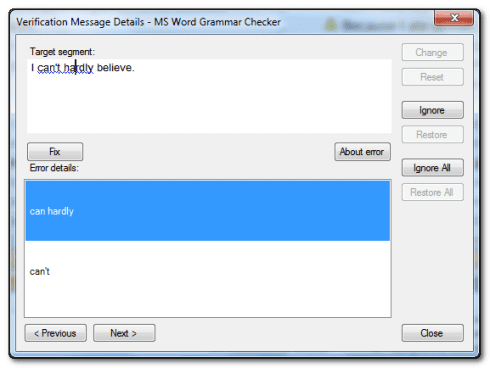
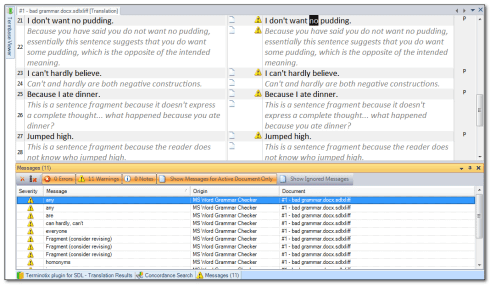
This application adds the Microsoft Word Grammar Checker to the SDL Trados Studio tool as part of the quality assurance features. The plugin is easy to install and its operation is executed through the Batch Task category. There is an option to run the Grammar Checker in real time as you translate the project segments.
The Grammar Checker application requires installation of MS Word and supports grammar checking in the languages supported by MS Word.
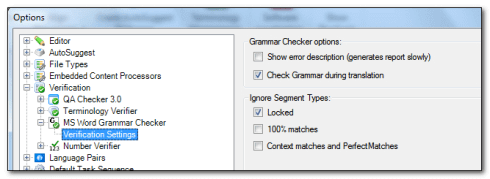
After installing the plugin restart SDL Trados Studio and go to Project Settings. You will see the MSWord Grammar Checker option at the bottom of the Verification menu. Check this box as shown in the picture.
Watch this YouTube for a demonstration on how to use to use the MSWord Grammar Checker application:

[embed]https://www.youtube.com/watch?v=K8-l6WKN36c&t=104s[/embed]
Explore Our Projects:

Think big: The 5 Leading Technological Trends of 2017

Have you heard the terms “Big Data”, “Automation” and “Augmented Reality” and had no idea what people were talking about?…
צילום מסך של תוכנת התרגום Studio Time חושף מסך מפוצל: Getting Started באנגלית משמאל ו-Erste Schritte בגרמנית מימין. הזמן שחלף הוא 00:02:14, עם פקדים להפעלה, הפסקה ועצירה נגישים בקלות לשימוש יעיל באולפן.

Studio Time Tracker

בענף התרגום נדרשת היום עבודה זריזה וגמישה – תוסף זה יסייע לנטר ולנהל את הזמן בעבודה על הפרוייקטים השונים. התוסף…
אדם, לבוש בחולצה לבנה ושעון חכם, מדפדף במילון על שולחן עץ. טבעת הטורקיז שלהם והציפורניים הצבועות בלבן מושכים את העין - אולי הם מחפשים את השיטה הטובה ביותר לתרגום אתרים בדפים האלה.

What is the best method for website translation?

If you’re not involved in the field, you might be confused and think that there’s just one way of going…
Discover more

Get a quick price quote

for our translation, localization, recording, and transcription services